Sketch, properties and Eurocode 3 checking of steel sections.

RGSHAPE is a desktop application for steel cross-sections: pick or draw the section, compute its properties on a finite-element mesh and check it to Eurocode 3, in one window.

Introduction

Draw a section, get its properties, check it

Any section, three ways in

From the AISC catalogue, from its dimensions, or drawn in the sketcher with dimensions and constraints.

Properties you can rely on

Area, inertias, elastic and plastic moduli, torsion constant and shear centre, computed on a finite-element mesh of the section as it is drawn, radii included.

Checked to Eurocode 3

Classification, resistance and stability checks of EN 1993-1-1 under your loads, each clause printed with its formula and its numbers.

Your sections, kept

One .gshape file holds the sections, their sketches and their meshes. Open it again and everything is there.

0.3 %
on the torsion constant J, against a converged fine-mesh solution, over 57 catalogue profiles
10
typical section families defined by their dimensions, beside the AISC catalogue
1 file
per library: sections, sketches and meshes together in a .gshape
Workflow

From a shape to a checked section

Dimensions in mm, properties in mm², mm³, mm⁴; forces in N and moments in N·mm in the check. Every sketching step can be undone.

The Standard section dialog of RGSHAPE: the AISC catalogue by family, with the dimensions and a preview of the chosen profile
01 · Sections

Catalogue and typical sections

  • Standard sections: the AISC catalogue shipped with the program, by family: W, channels, tees, angles, hollow sections.
  • Typical sections: I, H, monosymmetric I, T, channel, angle, rectangular and circular hollow, solid rectangle and round, from their dimensions, with a live preview.
  • Drawn with their radii: root radii of rolled sections, tees and angles, inside and outside corner radii of hollow sections.
  • Loaded into the sketcher in one click, where the section can still be edited.
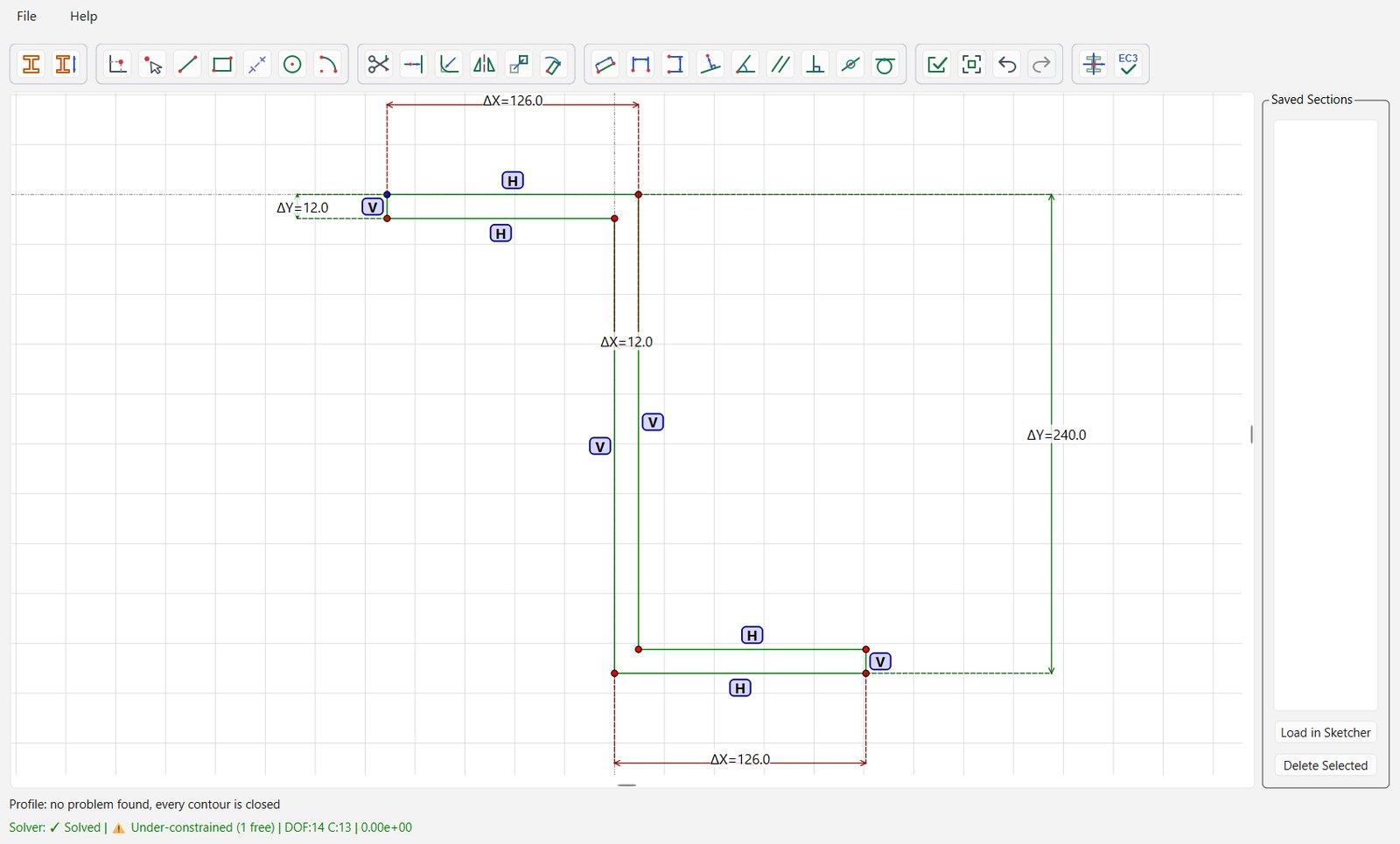
A Z-section drawn in the sketcher of RGSHAPE with its dimensions and constraints
02 · Sketch

Draw any section, with dimensions and constraints

  • Points, lines, rectangles, circles, arcs and construction lines; trim and extend; translate and rotate, as a move or as a copy.
  • Dimensions and constraints: distances in X and Y, angles and radii; parallel, perpendicular, coincident, tangent and symmetric; solved as you enter them.
  • Holes: any closed inner contour is a hole in the section.
  • Selection by click or by a Shift-drag box; undo and redo on every step.
A welded monosymmetric girder meshed in RGSHAPE, the mesh drawn over the section and the section listed with its area
03 · Properties

Computed on a finite-element mesh

  • Compute properties meshes the section with triangles and integrates on the mesh: area, centroid, inertias and principal axes, elastic and plastic moduli.
  • Torsion by the Saint-Venant solution on quadratic triangles: torsion constant J, torsion modulus and shear centre.
  • Any shape: the same computation for a catalogue profile, a welded girder or a section you drew, with or without holes.
  • The mesh stays with the section: drawn over it, saved in the file, cleared with a right-click.
The Eurocode 3 check dialog of RGSHAPE: section, steel grade, member length, loads and the printed result
04 · Eurocode 3 check

The section under your loads

  • Inputs: the section, the steel grade, the member length and buckling lengths, and the six internal forces N, Vy, Vz, T, My, Mz.
  • Classification of flanges and web to Table 5.2, then the checks of EN 1993-1-1: axial, bending, shear, torsion, cross-section interaction, flexural and lateral-torsional buckling, the §6.3.3 interaction.
  • Every clause printed with its formula and its numbers, then a summary table with the governing check.
  • Monosymmetric sections are checked with their own shear centre and monosymmetry parameter.
The RGSHAPE window with a double-web girder opened from a .gshape file: the sketch with its dimensions, the mesh, and the list of saved sections
05 · Files

A library of sections in one file

  • Saved sections are listed beside the sketcher with their origin and area; any of them loads back into the sketcher.
  • File › Save writes one .gshape file with the sections, their sketches, their properties and their meshes.
  • A double click on a .gshape file opens it in RGSHAPE.
  • Readable: the file is plain JSON text, in mm.
Eurocode 3 check

Every check, clause by clause

W14X90 in S355, 6 m long, under compression, shear and bending about both axes: a Class 3 section governed by the §6.3.3 interaction of axial force and bending.

Torsion policy: St Venant only; warping torsion is not considered. In the Demo Edition, Class 4 cross-sections are reported UNVERIFIED instead of being reduced to an effective section, and every result is marked "DEMO, FOR EVALUATION ONLY".

Clause           Check                   Util  Verdict
-------------------------------------------------------
§6.3.1           Axial buckling         0.103  OK
§6.2.5           Bending y              0.216  OK
§6.2.5           Bending z              0.041  OK
§6.3.2           LTB                    0.245  OK
§6.2.6           Shear z (web)          0.128  OK
§6.2.9 / 6.2.10  CS linear              0.324  OK
§6.3.3           Eq 6.61                0.369  OK
§6.3.3           Eq 6.62                0.391  OK  <- governs
-------------------------------------------------------
ALL CHECKS PASS   Max utilization = 0.391 (§6.3.3 Eq 6.62)
Validation

Section properties against the catalogue

W14X90 drawn with its root radius, default mesh of 787 nodes and 1 206 triangles, against the AISC shapes database.

The torsion constant is the mesh-dependent quantity; the geometric properties match to the rounding of the tables and to the idealised fillet. The mesh density can be increased.

PropertyComputedCatalogueDiff.
A (mm²)17 07117 097−0.2 %
Iy (mm⁴)414.4 ×10⁶415.8 ×10⁶−0.3 %
Iz (mm⁴)150.2 ×10⁶150.7 ×10⁶−0.3 %
J (mm⁴)1.698 ×10⁶1.690 ×10⁶+0.5 %
Get in touch

Try RGSHAPE on your own computer

RGSHAPE is in active development. The free Demo Edition has the whole workflow: catalogue, sketcher, properties, Eurocode 3 check and .gshape files.