Beam-structure modelling, analysis and Eurocode 3 checking.

KUSOR-3D is a desktop application for 3D beam structures: build the model, solve it and check every member to Eurocode 3, in one window.

Introduction

Simple to model, fast to check

Build a model in a few steps

A handful of dialogs, picking directly in the 3D view, ten undo steps. Every modelling dialog works on a selection made in the view.

Or start from a SACS deck

File › Import turns an existing SACS model into a ready-to-solve model: an offshore module of 1 436 members in a few seconds.

Check rapidly

Static analysis and Eurocode 3 checks for every combination, the utilisation drawn on the model, and the full check of any member one click away.

Results you can trust

Benchmarked against industrial software: utilisation within ±0.10 on 48 of 52 section groups, median ratio 0.984.

1 436
members of an offshore module imported from SACS in a few seconds
970
joints, 33 section groups and every load, support and release translated from the deck
0.984
median utilisation ratio against the reference software
Workflow

From geometry to a checked structure

Coordinates in metres, forces in N, moments in N·m; section geometry and properties in mm. Every model change can be undone.

The KUSOR-3D window: model tree, 3D view, toolbars by task and the Assign Section dialog on an offshore module
01 · Working environment

Three panels, one dialog at a time

  • Model tree on the left: nodes, elements, sections, materials, loads, boundaries and load cases, with show, hide, edit and delete.
  • Picking in the 3D view: a click toggles a node or a member, Shift-drag boxes a group.
  • One dialog at a time: Save applies the change, closes it and records one undo step.
  • Inspect reads any node or member; Views limits the display to a box in x, y, z.
A deck grillage of 27 nodes and 42 members built step by step in KUSOR-3D
02 · Model

Nodes, members and subdivisions

  • Create nodes by coordinates, at the midpoint of two nodes, or relative to picked nodes.
  • Create elements by picking two nodes; each member gets its local frame immediately.
  • Subdivide in equal parts, at a fixed length, a ratio, or a given X, Y or Z coordinate. Section, material, releases, offsets, loads and buckling lengths stay consistent.
The 2D sketcher of KUSOR-3D with a drawn section: outer contour, fillets and a round hole
03 · Sections

Library, parametric and drawn sections

  • Library: the AISC database shipped with the software; IPE, HE, UPN, RHS, CHS and L profiles through CSV tables.
  • Ten parametric families: I, H, plate girder, T, channel, angle, RHS, CHS, solid rectangle and round, prismatic or tapered.
  • 2D sketcher: points, lines, circles, arcs and fillets with constraints; any closed inner contour is a hole.
  • Properties by finite elements: area, centroid, inertias, Wel and Wpl, torsion constant J, warping constant Cw, shear centre and shear areas, computed on a triangular mesh.
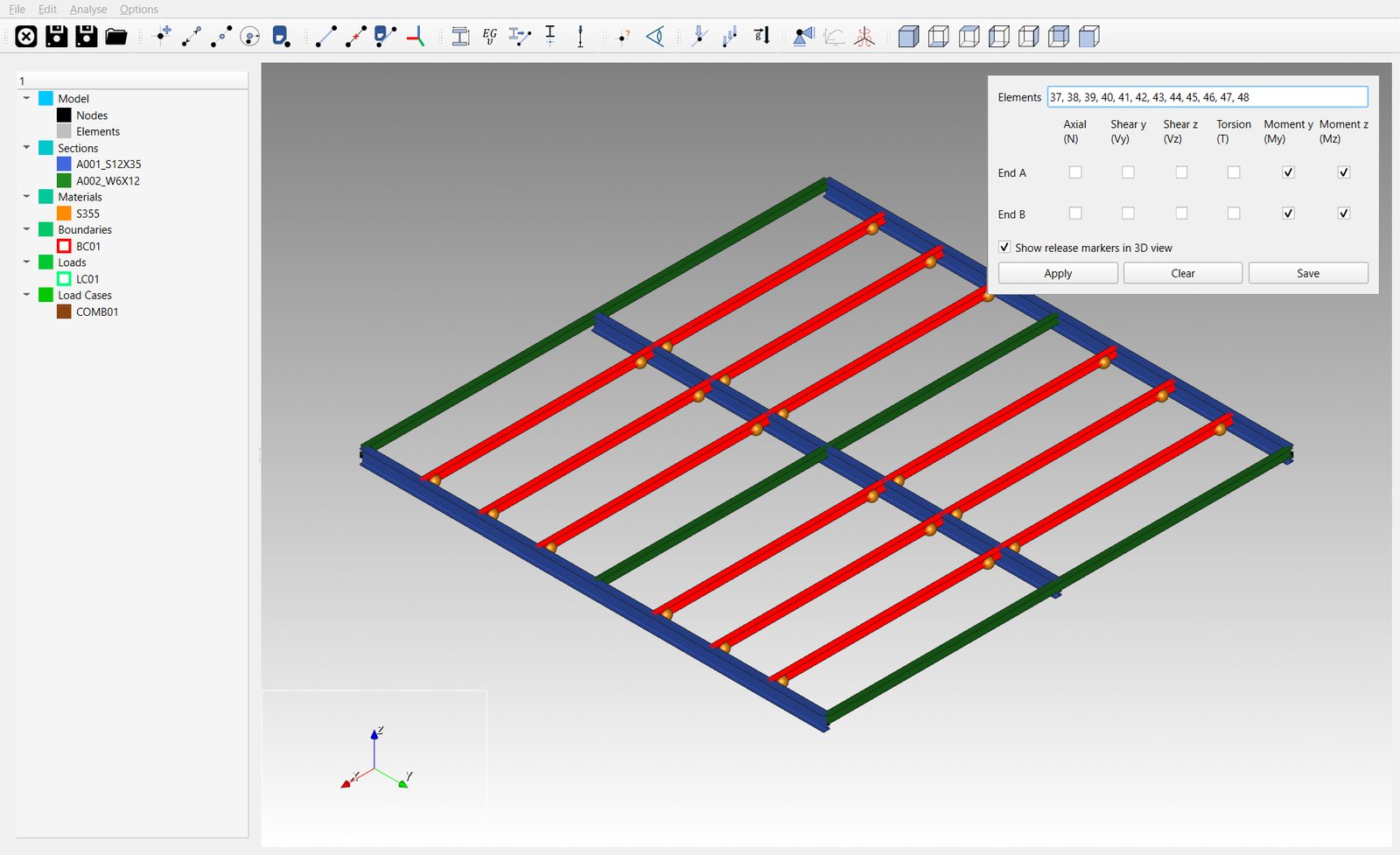
Member end releases shown as orange markers on the cross beams of a deck in KUSOR-3D
04 · Member data

Assignments, offsets, releases, buckling lengths

  • Assign Section: pick the members, choose a section and a material; each assignment holds its own copy of the section.
  • End offsets in global or local axes; the flexible member is tied to the nodes by rigid links.
  • End releases: N, Vy, Vz, T, My, Mz at each end, condensed statically by the solver.
  • Buckling lengths: Ky, Kz factors or Ly, Lz lengths, and the lateral-torsional length Lb; C1 and C2 set per combination by the check itself.
Distributed loads drawn along the cross beams of a deck in KUSOR-3D
05 · Loads and supports

Conditions, combinations, support sets

  • Concentrated loads at nodes and line loads on members, in global or local axes, grouped in load conditions.
  • Gravity as a definition: generated from the current sections and materials when the analysis starts, never stale.
  • Boundary conditions and elastic supports: several sets may coexist, each load case selects its set.
  • Load cases combine the conditions with factors in the Analysis window.
An offshore module of 970 joints and 1 436 members imported from a SACS deck into KUSOR-3D
06 · SACS import

A SACS deck becomes a model that solves

  • File › Import › SACS model: an input deck becomes a model that solves, renders and code-checks at once.
  • Sections: TUB to CHS, WF and PLG to I sections computed by the section engine, library shapes from the AISC and EN databases, CON sections as tapers.
  • Also translated: materials, local axes with the member roll, supports and springs, joint and member loads, combinations of combinations.
  • Import report: counts up front, everything not fully translated listed in the details.
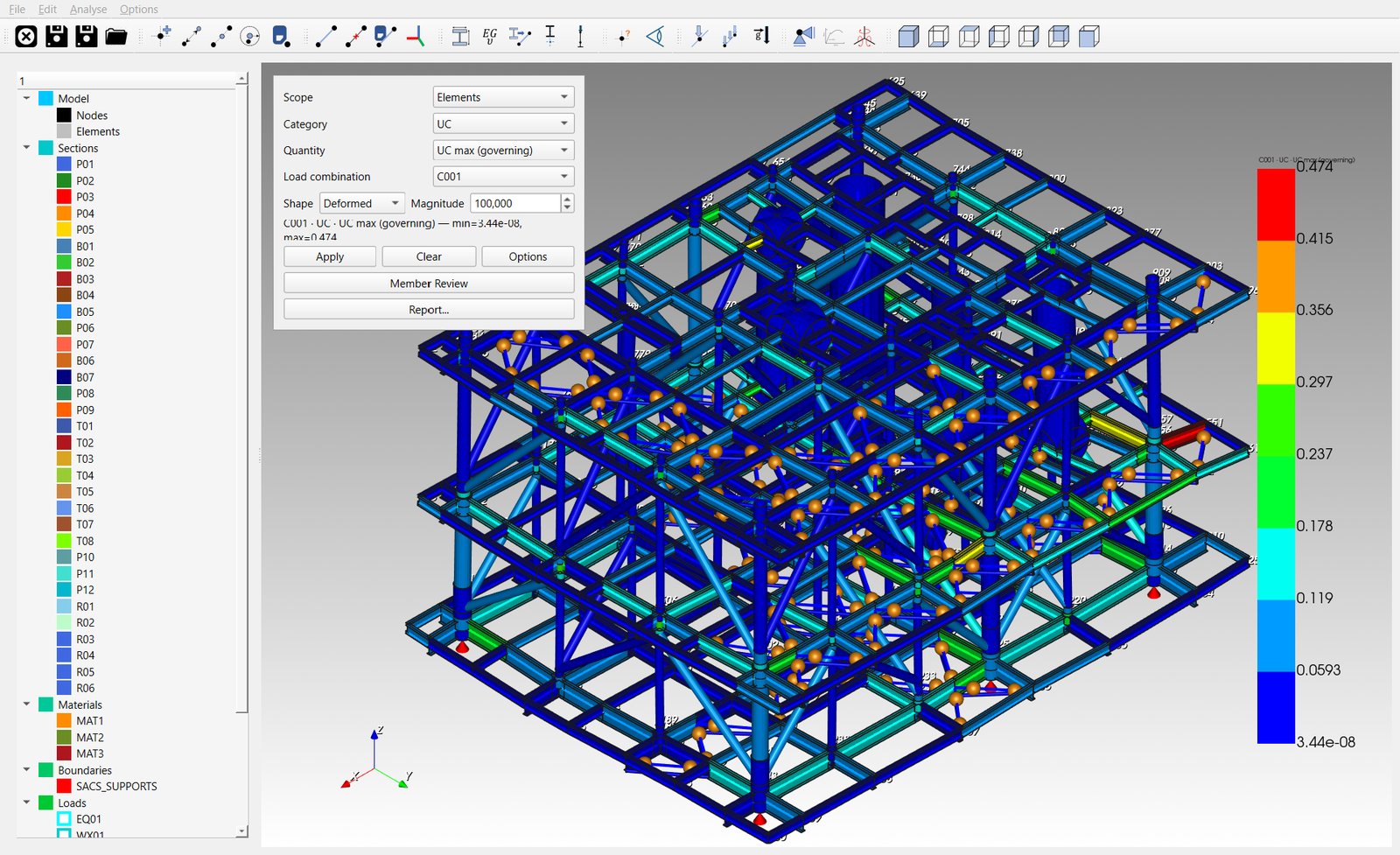
The deformed shape of the whole module coloured by the maximum Eurocode 3 utilisation
07 · Post-processing

Utilisation maps, forces, displacements, reactions

  • Nine utilisation quantities: governing, tension, axial, bending y and z, shear y and z, lateral-torsional buckling, combined, heat-mapped on the extruded sections.
  • Internal forces and stresses per member, displacements at nodes, reactions at supports, for any solved combination.
  • Deformed shape with any field drawn on it, magnitude proposed automatically.
  • Member review: pick a member and the full Eurocode 3 dialog opens pre-filled, every source printed, every field editable.
Member review

Every check, clause by clause

The same inputs as the batch check, for one member and one combination. Here member 678 of the module, governed by the §6.3.3 interaction of axial force and bending.

Torsion policy: St Venant only; warping torsion is not considered. The calculation report prints section properties, load cases and combinations, member end loads and the utilisation of every member for every check in one fixed-width text file.

Clause           Check                   Util  Verdict
-------------------------------------------------------
§6.3.1           Axial buckling         0.005  OK
§6.2.5           Bending y              0.122  OK
§6.2.5           Bending z              0.085  OK
§6.3.2           LTB                    0.246  OK
§6.2.6           Shear y (flange)       0.007  OK
§EN1993-1-5 §5   Shear z (web, V_bw,Rd) 0.099  OK
§6.2.7           Torsion (St. Venant)   0.001  OK
§6.2.7(9)        V_z + T (web)          0.099  OK
§6.2.7(9)        V_y + T (flange)       0.007  OK
§6.2.9 / 6.2.10  CS linear              0.210  OK
§6.3.3           Eq 6.61                0.335  OK
§6.3.3           Eq 6.62                0.337  OK  <- governs
-------------------------------------------------------
ALL CHECKS PASS   Max utilization = 0.337 (§6.3.3 Eq 6.62)
Validation

Section properties against the catalogue

IPE 400 with r = 21 mm, default mesh of 510 nodes and 686 triangles, against ArcelorMittal Sections V2023-5.

J and Cw are the mesh-dependent quantities and converge from below; the geometric properties match to the rounding of the tables. The mesh density can be increased.

PropertyComputedCatalogueDiff.
A (mm²)8 4508 4500.0 %
Iy (mm⁴)231.4 ×10⁶231.2 ×10⁶+0.1 %
Iz (mm⁴)13.18 ×10⁶13.17 ×10⁶+0.1 %
Wel,y (mm³)1 157 ×10³1 156 ×10³+0.1 %
Wpl,y (mm³)1 308 ×10³1 307 ×10³+0.1 %
Wel,z (mm³)146.4 ×10³146.4 ×10³0.0 %
Wpl,z (mm³)229.0 ×10³229.0 ×10³0.0 %
J (mm⁴)491.6 ×10³512.7 ×10³−4.1 %
Cw (mm⁶)4.83 ×10¹¹4.90 ×10¹¹−1.4 %
Video

A topside built from an empty model

Three minutes in KUSOR-3D: the structure rebuilt from nothing, bottom to top, with the dialogs and the picking as they are in the program.

3 min 03 s, no sound, 24 MB. Download the video (MP4).

Get in touch

Try KUSOR-3D on your own computer

KUSOR-3D is in active development. The free Demo Edition lets you build, solve and check a small model with the full workflow.